Blind World Hub
Accessible apps, guides and video reviews for blind and visually impaired people, shared by Waqas, a blind creator who reviews apps with a screen reader.
Latest on Blind World Hub
-
Smart TTS 1.7
Smart TTS 1.7 says the caller's full name or number on phone and WhatsApp calls, even while you swipe, moves speech to the phone's speaker faster with Bluetooth, and brings updates inside the app.
Smart TTS is a free text-to-speech engine for Android, made for blind and visually impaired people who use TalkBack, Jieshuo and other screen readers.
New in version 1.7
Call Announcer improved
Phone calls and WhatsApp calls are now announced reliably. The caller's name or number is always said in full, even while you swipe or touch the screen, without waiting and in the voice you chose.
Bluetooth speaker improved
While music or video plays on Bluetooth, speech moves to the phone's own speaker faster and more reliably. A new option, Always on the phone's speaker (Beta), keeps speech on the phone's speaker the whole time Bluetooth is connected.
Updates inside the app
From the next update, Smart TTS downloads and installs its updates by itself.
How to update
If Smart TTS is already on your phone, download the APK below and install it over the old version. Your settings stay as they are.
How to start for the first time
Download the APK below and install it.
Open Smart TTS and choose the voices and languages you want.
Go to your phone's Settings, then Accessibility, then Text-to-speech output, and select Smart TTS as the preferred engine.
Smart TTS is made by Blind World Hub for blind and visually impaired users.
-
Smart TTS 1.6
Smart TTS 1.6 makes Call Announcer more reliable for phone and WhatsApp calls, even with the screen off, fixes Payment Announcer, and keeps speech on the phone's speaker while music plays on Bluetooth.
Smart TTS is a free text-to-speech engine for Android, made for blind and visually impaired people who use TalkBack, Jieshuo and other screen readers.
New in version 1.6
Call Announcer improved
Incoming phone calls and WhatsApp calls are now announced reliably with the caller's name or number, even when the screen is off.
Payment Announcer fixed
Payment announcements are now more reliable, so you always hear the amount and the name when money is sent or received.
Bluetooth speaker fixed
While music or video plays on a Bluetooth speaker or earbuds, speech now comes from the phone's own speaker. When nothing is playing, speech returns to Bluetooth.
Stability
General stability improvements for smoother everyday use.
How to update
If Smart TTS is already on your phone, download the APK below and install it over the old version. Your settings stay as they are.
How to start for the first time
- Download the APK below and install it.
- Open Smart TTS and choose the voices and languages you want.
- Turn on Call Announcer and Payment Announcer in the settings if you want to use them.
- Go to your phone's Settings, then Accessibility, then Text-to-speech output, and select Smart TTS as the preferred engine.
Smart TTS is made by Blind World Hub for blind and visually impaired users.
-
Text to Voice Studio
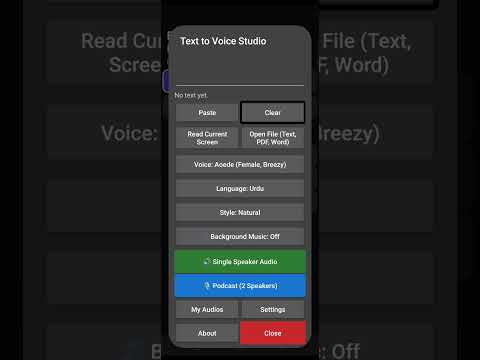
A Jieshuo extension that turns any text into natural speech with Google Gemini voices. Make audio or a two-person podcast, with 30 voices and 23 speaking styles, in any language.
Text to Voice Studio is a Jieshuo extension that turns any text into natural, human-like speech using Google Gemini voices. It is built to be fully accessible with the Jieshuo screen reader and works with any language.
Main features
• Single Speaker Audio: Convert any text into a clear, natural voice recording.
• Podcast (2 Speakers): Turn any topic or text into a two-person podcast. The script is written automatically and voiced by two different hosts. Choose the length (from short to full detail) and the tone.
• 30 Natural Voices: Male and female voices, each with its own character. Play a sample before you choose.
• 23 Speaking Styles: Including News Anchor, Storyteller, Audiobook Narrator, Documentary, Teacher, Kids Story, Poetry Recitation, Motivational Speaker, Radio Host, Meditation and many more.
• Long Text Support: Long texts are made part by part and joined automatically into one smooth audio file, with even volume and natural pauses throughout.
• Smart Text Preparation: Text without punctuation is prepared automatically for natural reading, without changing a single word.
• Multiple Text Sources: Type, paste, open a text file, or read the current screen.
• Built-in Player: Play, pause, skip forward or back 10 seconds, change the speed, and listen to the ready parts while the rest of the audio is still being made.
• Background Work: Hide the window and keep using your phone while the audio is being made.
• Resume Anytime: If the work stops because there is no internet or the free daily limit is reached, it is saved and can be continued later from My Audios.
• My Audios: Play, rename, share or delete your audios, or save a copy to the Download folder.
• File Type and Save Location: Save as M4A (small size) or WAV (best quality), in the Music, Download or Documents folder.
Requirements
• The Jieshuo screen reader.
• An internet connection while the audio is being made.
• A free Gemini API key from Google AI Studio (aistudio.google.com), added once in Settings.
How to install
- Download the PPK file below.
- Open Jieshuo and import the file as an extension (plugin).
- Open Text to Voice Studio, go to Settings, and add your Gemini API key.
Developed by Waqas.
-
Smart TTS 1.5
Smart TTS 1.5 adds Call Announcer and Payment Announcer: hear who is calling and who sent or received money. It also reads mixed-language text better, with each word in its own voice.
Smart TTS is a free text-to-speech engine for Android, made for blind and visually impaired people who use TalkBack, Jieshuo and other screen readers.
New in version 1.5
Call Announcer
When a call comes in, Smart TTS speaks the caller's name. If the number is not saved in your contacts, it reads the number digit by digit.
Payment Announcer
When money is sent or received, Smart TTS tells you the amount and the name, so you know about the payment without opening the app.
A separate language for calls and payments
You can choose one language for call announcements and another for payment announcements.
Lower the ringtone while the caller is said
This new option makes the ringtone quieter while the caller's name is spoken, so you can hear the name clearly.
Better reading of mixed languages
When a text mixes languages that are written in the same script, each word is now read by the voice of its own language.
How to update
If Smart TTS is already on your phone, download the APK below and install it over the old version. Your settings stay as they are.
How to start for the first time
- Download the APK below and install it.
- Open Smart TTS and choose the voices and languages you want.
- Turn on Call Announcer and Payment Announcer in the settings if you want to use them.
- Go to your phone's Settings, then Accessibility, then Text-to-speech output, and select Smart TTS as the preferred engine.
Smart TTS is made by Blind World Hub for blind and visually impaired users.
-
Multi TTS 1.8.3 (32-bit)
MultiTTS 1.8.3 for older 32-bit Android phones. A free text-to-speech engine: import voice packs for any language and use them with TalkBack, Jieshuo and other screen readers.
This is the 32-bit version of MultiTTS 1.8.3, made for older Android phones that cannot install the normal 64-bit version. If the 64-bit version gives an error such as "App not installed" or "There was a problem parsing the package", or does not open, use this version instead.
MultiTTS is a free text-to-speech (TTS) engine for Android. It comes with no voices of its own. Instead, you import the voices you want into it, as voice pack zip files, and then use them on your phone.
How it works
Import a voice pack: download a voice pack zip file, then import it into MultiTTS.
Choose a speaker: after importing, choose the speaker (voice) you like from that pack.
Use it everywhere: MultiTTS works as your phone's text-to-speech engine, so screen readers such as TalkBack and Jieshuo, e-book readers and other apps can speak with the voice you chose.
Main features
Works on older 32-bit Android phones.
Voice packs are available for many languages of the world, not only a few.
Import as many voice packs as you want, and change the speaker at any time.
Choose a different voice for each language, and change the speed and pitch to suit you.
How to start
- Download the APK below and install it.
- Open MultiTTS and import a voice pack zip file.
- Choose the speaker you want to use.
- Go to your phone's Settings, then Accessibility, then Text-to-speech output, and select MultiTTS as the preferred engine.
Which version should I download?
Most new phones are 64-bit, so try the normal 64-bit version first. Use this 32-bit version only if the 64-bit one does not install or does not work on your phone.
MultiTTS is made by its own developer and shared here for the convenience of blind and visually impaired users.
-
Smart TTS
A smart text to speech engine for blind people: Urdu, Hindi and English in the right voice, built-in Reed voice, backup voices, and now settings for each app.
Smart TTS is a text to speech engine made for blind and visually impaired people. It works with TalkBack, Jieshuo and every screen reader, and reads Urdu, Hindi and English, each in the voice you choose, even when they are mixed in one sentence.
Main features
- Built-in Reed voice for English, clear and fast, with Pakistani names read correctly.
- A different voice, speed, pitch and volume for each language.
- Backup voices: if a voice stops or does not answer, another one reads at once, so no sentence is lost.
- Numbers, dates, times, money and emojis read naturally, in Urdu and Hindi words too.
- Verification codes from messages copied and said slowly.
- Backup and restore of your settings and dictionary, to share with friends or move to a new phone.
- Settings for each app, hold the phone to your ear to listen privately, shake to copy what was just said.
- Your own dictionary for words and names.
- Make an audio file from any text.
- Updates, messages from the developer and problem reports, only with your permission.
Privacy
Smart TTS has no accounts, no ads and no tracking. What you read stays on your phone.
Works on Android 7 and newer. Free.
Developer: Muhammad Waqas Farooq, Blind World Hub.
-
Blind World Hub Screen Recorder
An accessible screen recorder for blind and visually impaired people, now with background music that gets softer by itself whenever you or your screen reader speaks.
Blind World Hub Screen Recorder is a screen recorder made for blind and visually impaired people. It works fully with TalkBack, Jieshuo and other screen readers, so you can record your phone's screen on your own: to make tutorials for YouTube, to show someone a problem on your phone, or to share how an app works with a screen reader.
New in version 1.1: background music
- Add background music to your recordings: choose any song or music file from your phone, and it plays softly under your recording.
- Music volume: from silent to louder than normal. Music softer and Music louder change it while you are recording.
- The music gets softer when someone speaks: when you or your screen reader speaks, the music goes down by itself and comes back up in the pauses, like on FM radio.
- Ready-made styles: FM radio (recommended), YouTube tutorial, Soft and relaxed, Like GoldWave, Silent while someone speaks, My own settings, or Off.
- Voice sensitivity: High for soft voices in a quiet room, Medium for most people, Low for noisy places, so fans and traffic do not lower the music.
- A louder voice lowers the music a little more, so it sounds natural.
- Clear space for the voice: only the part of the music where voices sit goes down, so the music stays full and your voice stays clear.
- Every song at about the same loudness, so every video sounds even.
- The music comes in gently over 2 seconds and fades out at the end.
- Background music in Make video: add music to a recording you already made, with the same options.
Why we made it
Most screen recorders are hard to use without sight: unlabeled buttons, no clear signal when recording starts, and the screen reader's voice is often missing from the video. This app was built so that a blind person knows exactly what is happening at every moment.
Main features
- Every button and setting is labeled and speaks clearly with any screen reader.
- Countdown before recording (you choose the seconds), spoken aloud and felt with a vibration for each second; a long vibration tells you recording has started. Nothing is spoken after that, so your recording stays clean.
- Record your own voice and the screen reader's voice together through the microphone, whatever voice engine you use. On Android 10 or newer, the phone's internal sound can be recorded too, where the phone allows it.
- Pause, Resume and Stop and save from the notification, from the app, from the quick settings button, or from floating Pause and Stop buttons at the side of the screen.
- Add a Record button to quick settings, to start recording from anywhere.
- Take a screenshot with one button.
- Video quality: 360p, 480p, 720p (recommended), 1080p, or the phone's own screen size; 15, 24, 30 or 60 frames a second; follow the phone's rotation or always portrait or landscape.
- Optional: stop and save automatically when the screen is locked, speak when a recording is saved, vibrate for start, pause and save.
- Recordings are saved in the Movies folder and screenshots in the Pictures folder. From the Recordings list you can share, rename or delete them.
- Automatic update notice: when a new version is published, the app tells you and opens the download.
- A simple error log you can share to help us fix problems. It never contains your recordings or personal data.
Privacy
Your recordings and your music stay on your phone until you share them. The app sends nothing about you anywhere; it only checks for a new version.
Works on Android 7 and newer. Free, with no ads.
Developer: Muhammad Waqas Farooq, Blind World Hub.
Download Blind World Hub Screen Recorder 1.1, APK file, 5.4 MB
-
Google TTS For NVDA is now officially available in the NVDA Add-on Store
Google TTS For NVDA, the free offline Google voices for the NVDA screen reader, is now in the official NVDA Add-on Store.
New apps
See all apps-
Smart TTS 1.7
Smart TTS 1.7 says the caller's full name or number on phone and WhatsApp calls, even while you swipe, moves speech to the phone's speaker faster with Bluetooth, and brings updates inside the app.
Smart TTS is a free text-to-speech engine for Android, made for blind and visually impaired people who use TalkBack, Jieshuo and other screen readers.
New in version 1.7
Call Announcer improved
Phone calls and WhatsApp calls are now announced reliably. The caller's name or number is always said in full, even while you swipe or touch the screen, without waiting and in the voice you chose.
Bluetooth speaker improved
While music or video plays on Bluetooth, speech moves to the phone's own speaker faster and more reliably. A new option, Always on the phone's speaker (Beta), keeps speech on the phone's speaker the whole time Bluetooth is connected.
Updates inside the app
From the next update, Smart TTS downloads and installs its updates by itself.
How to update
If Smart TTS is already on your phone, download the APK below and install it over the old version. Your settings stay as they are.
How to start for the first time
Download the APK below and install it.
Open Smart TTS and choose the voices and languages you want.
Go to your phone's Settings, then Accessibility, then Text-to-speech output, and select Smart TTS as the preferred engine.
Smart TTS is made by Blind World Hub for blind and visually impaired users.
-
Smart TTS 1.6
Smart TTS 1.6 makes Call Announcer more reliable for phone and WhatsApp calls, even with the screen off, fixes Payment Announcer, and keeps speech on the phone's speaker while music plays on Bluetooth.
Smart TTS is a free text-to-speech engine for Android, made for blind and visually impaired people who use TalkBack, Jieshuo and other screen readers.
New in version 1.6
Call Announcer improved
Incoming phone calls and WhatsApp calls are now announced reliably with the caller's name or number, even when the screen is off.
Payment Announcer fixed
Payment announcements are now more reliable, so you always hear the amount and the name when money is sent or received.
Bluetooth speaker fixed
While music or video plays on a Bluetooth speaker or earbuds, speech now comes from the phone's own speaker. When nothing is playing, speech returns to Bluetooth.
Stability
General stability improvements for smoother everyday use.
How to update
If Smart TTS is already on your phone, download the APK below and install it over the old version. Your settings stay as they are.
How to start for the first time
- Download the APK below and install it.
- Open Smart TTS and choose the voices and languages you want.
- Turn on Call Announcer and Payment Announcer in the settings if you want to use them.
- Go to your phone's Settings, then Accessibility, then Text-to-speech output, and select Smart TTS as the preferred engine.
Smart TTS is made by Blind World Hub for blind and visually impaired users.
-
Text to Voice Studio
A Jieshuo extension that turns any text into natural speech with Google Gemini voices. Make audio or a two-person podcast, with 30 voices and 23 speaking styles, in any language.
Text to Voice Studio is a Jieshuo extension that turns any text into natural, human-like speech using Google Gemini voices. It is built to be fully accessible with the Jieshuo screen reader and works with any language.
Main features
• Single Speaker Audio: Convert any text into a clear, natural voice recording.
• Podcast (2 Speakers): Turn any topic or text into a two-person podcast. The script is written automatically and voiced by two different hosts. Choose the length (from short to full detail) and the tone.
• 30 Natural Voices: Male and female voices, each with its own character. Play a sample before you choose.
• 23 Speaking Styles: Including News Anchor, Storyteller, Audiobook Narrator, Documentary, Teacher, Kids Story, Poetry Recitation, Motivational Speaker, Radio Host, Meditation and many more.
• Long Text Support: Long texts are made part by part and joined automatically into one smooth audio file, with even volume and natural pauses throughout.
• Smart Text Preparation: Text without punctuation is prepared automatically for natural reading, without changing a single word.
• Multiple Text Sources: Type, paste, open a text file, or read the current screen.
• Built-in Player: Play, pause, skip forward or back 10 seconds, change the speed, and listen to the ready parts while the rest of the audio is still being made.
• Background Work: Hide the window and keep using your phone while the audio is being made.
• Resume Anytime: If the work stops because there is no internet or the free daily limit is reached, it is saved and can be continued later from My Audios.
• My Audios: Play, rename, share or delete your audios, or save a copy to the Download folder.
• File Type and Save Location: Save as M4A (small size) or WAV (best quality), in the Music, Download or Documents folder.
Requirements
• The Jieshuo screen reader.
• An internet connection while the audio is being made.
• A free Gemini API key from Google AI Studio (aistudio.google.com), added once in Settings.
How to install
- Download the PPK file below.
- Open Jieshuo and import the file as an extension (plugin).
- Open Text to Voice Studio, go to Settings, and add your Gemini API key.
Developed by Waqas.
-
Smart TTS 1.5
Smart TTS 1.5 adds Call Announcer and Payment Announcer: hear who is calling and who sent or received money. It also reads mixed-language text better, with each word in its own voice.
Smart TTS is a free text-to-speech engine for Android, made for blind and visually impaired people who use TalkBack, Jieshuo and other screen readers.
New in version 1.5
Call Announcer
When a call comes in, Smart TTS speaks the caller's name. If the number is not saved in your contacts, it reads the number digit by digit.
Payment Announcer
When money is sent or received, Smart TTS tells you the amount and the name, so you know about the payment without opening the app.
A separate language for calls and payments
You can choose one language for call announcements and another for payment announcements.
Lower the ringtone while the caller is said
This new option makes the ringtone quieter while the caller's name is spoken, so you can hear the name clearly.
Better reading of mixed languages
When a text mixes languages that are written in the same script, each word is now read by the voice of its own language.
How to update
If Smart TTS is already on your phone, download the APK below and install it over the old version. Your settings stay as they are.
How to start for the first time
- Download the APK below and install it.
- Open Smart TTS and choose the voices and languages you want.
- Turn on Call Announcer and Payment Announcer in the settings if you want to use them.
- Go to your phone's Settings, then Accessibility, then Text-to-speech output, and select Smart TTS as the preferred engine.
Smart TTS is made by Blind World Hub for blind and visually impaired users.
-
Multi TTS 1.8.3 (32-bit)
MultiTTS 1.8.3 for older 32-bit Android phones. A free text-to-speech engine: import voice packs for any language and use them with TalkBack, Jieshuo and other screen readers.
This is the 32-bit version of MultiTTS 1.8.3, made for older Android phones that cannot install the normal 64-bit version. If the 64-bit version gives an error such as "App not installed" or "There was a problem parsing the package", or does not open, use this version instead.
MultiTTS is a free text-to-speech (TTS) engine for Android. It comes with no voices of its own. Instead, you import the voices you want into it, as voice pack zip files, and then use them on your phone.
How it works
Import a voice pack: download a voice pack zip file, then import it into MultiTTS.
Choose a speaker: after importing, choose the speaker (voice) you like from that pack.
Use it everywhere: MultiTTS works as your phone's text-to-speech engine, so screen readers such as TalkBack and Jieshuo, e-book readers and other apps can speak with the voice you chose.
Main features
Works on older 32-bit Android phones.
Voice packs are available for many languages of the world, not only a few.
Import as many voice packs as you want, and change the speaker at any time.
Choose a different voice for each language, and change the speed and pitch to suit you.
How to start
- Download the APK below and install it.
- Open MultiTTS and import a voice pack zip file.
- Choose the speaker you want to use.
- Go to your phone's Settings, then Accessibility, then Text-to-speech output, and select MultiTTS as the preferred engine.
Which version should I download?
Most new phones are 64-bit, so try the normal 64-bit version first. Use this 32-bit version only if the 64-bit one does not install or does not work on your phone.
MultiTTS is made by its own developer and shared here for the convenience of blind and visually impaired users.
-
Smart TTS
A smart text to speech engine for blind people: Urdu, Hindi and English in the right voice, built-in Reed voice, backup voices, and now settings for each app.
Smart TTS is a text to speech engine made for blind and visually impaired people. It works with TalkBack, Jieshuo and every screen reader, and reads Urdu, Hindi and English, each in the voice you choose, even when they are mixed in one sentence.
Main features
- Built-in Reed voice for English, clear and fast, with Pakistani names read correctly.
- A different voice, speed, pitch and volume for each language.
- Backup voices: if a voice stops or does not answer, another one reads at once, so no sentence is lost.
- Numbers, dates, times, money and emojis read naturally, in Urdu and Hindi words too.
- Verification codes from messages copied and said slowly.
- Backup and restore of your settings and dictionary, to share with friends or move to a new phone.
- Settings for each app, hold the phone to your ear to listen privately, shake to copy what was just said.
- Your own dictionary for words and names.
- Make an audio file from any text.
- Updates, messages from the developer and problem reports, only with your permission.
Privacy
Smart TTS has no accounts, no ads and no tracking. What you read stays on your phone.
Works on Android 7 and newer. Free.
Developer: Muhammad Waqas Farooq, Blind World Hub.


Guides
All guidesNew guides are on their way.
News
All news-
Google TTS For NVDA is now officially available in the NVDA Add-on Store
Google TTS For NVDA, the free offline Google voices for the NVDA screen reader, is now in the official NVDA Add-on Store.
-
Welcome to Blind World Hub
Blind World Hub is now online: accessible apps, guides and videos for blind and visually impaired people, in one place.
Join the community
Ask questions, suggest apps and hear about new uploads first.